
How to Read and Understand Home ECG Monitor Summary Reports (2026)
Key Takeaways
- Learning to read your home ECG monitor summary report empowers you to spot heart rhythm changes and communicate more effectively with your provider.
- Summary reports highlight heart rate, rhythm, and flagged irregularities, but do not replace professional medical interpretation.
- Careful attention to flagged events, device symbols, and trend tracking can help you get the most out of at-home cardiac monitoring.
Introduction: Why Reading Home ECG Monitor Summary Reports Matters
Home ECG monitoring has changed how we approach heart health. Whether you’re managing a known arrhythmia, post-procedure recovery, or tracking new symptoms, these devices put real-time rhythm data in your hands. Yet, interpreting a summary report for the first time can be daunting. Understanding the basics not only helps you use the technology more confidently but also ensures you get the right support when something unusual appears.
Who this is for
This article is designed for anyone using a personal ECG device at home—patients, caregivers, or those simply looking to monitor their heart rhythm more closely. If you’ve ever wondered what those lines, numbers, and highlighted findings in your ECG report actually mean, you’re in the right place.
What Is a Home ECG Monitor Summary Report?
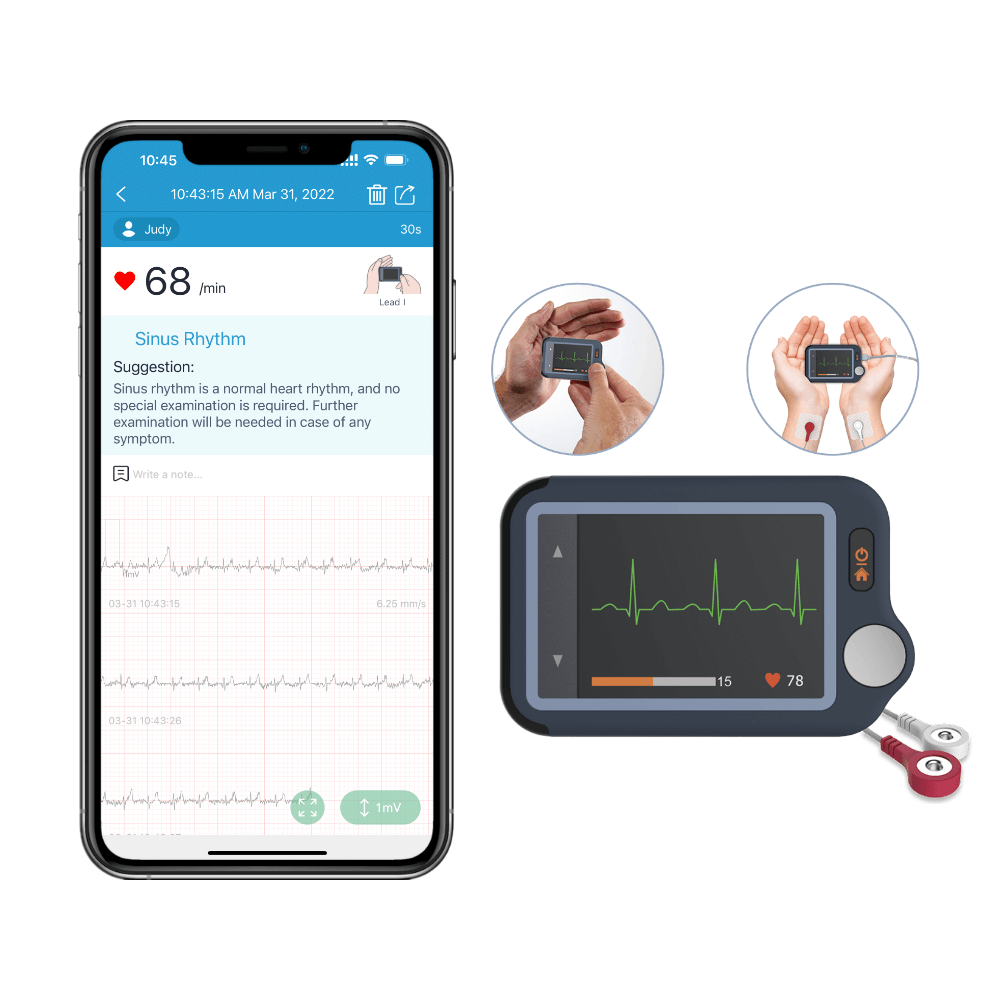
Most modern home ECG monitors, such as the Touchscreen ECG Monitor or Biocare iE6, generate a summary report after each recording. These reports distill your heart’s electrical activity into understandable metrics and visual summaries. Key data points typically include your average heart rate, rhythm type (like sinus rhythm), any detected irregularities, and waveform snapshots. The goal is to give you and your provider a quick snapshot rather than a full clinical-grade ECG analysis.
ECG monitor summary report explained
Home ECG summary reports focus on actionable highlights—heart rate, rhythm regularity, and any detected arrhythmias or pauses. These are complemented by snippets of the waveform itself, showing typical heartbeats and any flagged outliers. AI analysis is now common, flagging patterns that suggest arrhythmia or other issues, but always with the caveat that these findings are not medical diagnoses.
Key Sections of an ECG Monitor Summary Report
- Personal and recording details: Confirms the patient, date, and duration of the ECG.
- Heart rate and rhythm overview: Displays average heart rate, rhythm assessment (e.g., sinus, irregular), and sometimes heart rate variability.
- Interpretation highlights: Flags detected events such as skipped beats, pauses, or irregular rhythms (like PVCs).
- Waveform snapshots: Shows representative samples of your heart’s electrical activity, including P, QRS, and T waves.
- AI analysis/automated findings: Some devices include automated summaries, offering possible explanations for irregularities.
Step-by-Step Guide: Understanding Your ECG Device Report
- Confirm data accuracy and a valid recording. Was the test performed as instructed? Look for artifacts or device warnings that might suggest a poor connection or movement during recording.
- Interpret heart rate, rhythm, and variability. The report will note your average heart rate (in bpm) and usually state the rhythm type (e.g., "Normal sinus rhythm"). A rate outside typical adult ranges (roughly 60–100 bpm) or a rhythm marked as irregular deserves closer attention, especially if accompanied by symptoms.
- Review flagged events or abnormalities. If the device reports "possible arrhythmia," "pause detected," or flags skipped beats, make a note. Understanding ECG device reports means recognizing these callouts as advisories to discuss with your provider, not standalone diagnoses.
- Compare waveform sections. Some reports show intervals: P wave, QRS complex, and T wave durations. Consistency across beats and absence of unusual spikes or gaps is reassuring but does not guarantee normal function.
- Understand device-specific terms and symbols. Each manufacturer may use different icons or language (for example, "PVC" for premature ventricular contraction). Use your device manual’s glossary or the table below to decode these terms.
What to Do With Your ECG Summary: Next Steps
- If the report highlights an abnormal rhythm, a significant pause, or anything you don’t understand—especially if you have symptoms—contact your healthcare provider.
- Track trends over time. Many devices let you export and review multiple reports, helping you spot changes in heart rate or rhythm that may warrant a conversation with your doctor.
- Remember: At-home ECG interpretations are informational. Only a medical professional can diagnose or rule out a condition.
Troubleshooting Inaccurate or Unclear ECG Reports
- Common causes of recording errors: Poor skin contact, movement, dry skin, or electrical interference can all disrupt the signal.
- Tips for better ECG recordings at home: Sit still, relax arms and hands, and follow your device’s placement instructions closely.
- When to repeat a recording: If you see excessive artifact warnings or unclear results, redo the test. If issues persist, consult the device manual or your provider.
Summary Table: Common Terms and Findings in Home ECG Reports
| Term | What It Means | When to Seek Advice |
|---|---|---|
| Sinus Rhythm | Normal, regular heart rhythm | If symptoms appear despite normal reading |
| PVC (Premature Ventricular Contraction) | Extra or skipped beat; often benign | If frequent or with symptoms |
| Artifact | Recording error due to movement or poor contact | Repeat test if frequent |
| Arrhythmia | Irregular rhythm detected | Contact provider, especially if symptomatic |
| Pause Detected | Brief stop in heartbeat | Contact provider for further advice |
If You're Unsure
If you’re new to home ECG monitoring and are unsure which product or report style is best for you, start with a device that offers straightforward summary reports and easy export options (such as the Touchscreen ECG Monitor). If you're comfortable with more technical data and want long-term tracking, consider a system with expanded data management like the ECG 1000.
Product Examples

Conclusion: Building Confidence in Reading Home ECG Monitors
Reading a home ECG monitor summary report is a valuable skill for anyone invested in their cardiac wellness. These devices deliver accessible insights, but always remember: they’re a tool, not a substitute for medical advice. If unsure about any finding or symptom, reach out to your healthcare provider. For most users, starting with a clear, user-friendly device like the Touchscreen ECG Monitor is the best path, while those needing deeper data management may prefer the ECG 1000 system as an alternative.
Related reading
Sources and verification
Last checked: February 10, 2026
-
ECG data acquisition box with lead wires for Biocare iE6 6-Channel ECG Machine – Wellue
No snippet
-
ECG Management System – Wellue
ECG data management for Biocare 12-lead ECG machines: 12-lead ECG tablet, iE300 3-channel ECG machine, iE6 6-channel ECG machine, iE12A 12-channel ECG machine. It is composed of the installation U disk, the USB dog driver and a set of serial port cable. And The U disk includes ECG Management installation program and the dongle program modules. • Compatible with Windows XP, Win7, Win8, Win10, Vista in 32/64 bit;• Connect with all Biocare ECGs by different ports: RS-232, USB, LAN and WIFI;• Support single file or batched files imported from ECGs;• Huge data storage and management capability;• High accuracy electronic ruler for ECG files re-analysis and re-edit;• Powerful standard and customized diagnosis templates;• Multiple file formats to export: XML, DICOM, BMP, JPG, PDF;• Support A4 paper printing.
-
Personal ECG Monitor with AI Analysis. Get ECGs & Results on Touchscreen or APP. – Wellue
Take ECG on your palm or take noise-free ECG with external cable as you like. Enable to take ECGs for kids with external cable. 30 seconds/60seconds/5minutes recording duration for choose.
-
Medical Devices | FDA
The .gov means it’s official.Federal government websites often end in .gov or .mil. Before sharing sensitive information, make sure you're on a federal government site. The site is secure. The https:// ensures that you are connecting to the official website and that any information you provide is encrypted and transmitted securely. Helping innovators, providers, and patients reimagine the home as an integral part of the health care system.
-
High Blood Pressure - What Is High Blood Pressure? | NHLBI, NIH
An official website of the United States government Official websites use .gov A .gov website belongs to an official government organization in the United States. Secure .gov websites use HTTPS A lock ( A locked padlock ) or https:// means you’ve safely connected to the .gov website. Share sensitive information only on official, secure websites.
-
High blood pressure (hypertension) - Symptoms & causes - Mayo Clinic
High blood pressure is a common condition that affects the body's arteries. It's also called hypertension. If you have high blood pressure, the force of the blood pushing against the artery walls is consistently too high. The heart has to work harder to pump blood. Blood pressure is measured in millimeters of mercury (mm Hg). In general, hypertension is a blood pressure reading of 130/80 mm Hg or higher. The American College of Cardiology and the American Heart Association divide blood pressure into four general categories. Ideal blood pressure is categorized as normal.