
Home ECG Monitor Not Working? Step-by-Step Fixes for 2026
Key Takeaways
- Most home ECG monitor issues can be resolved with basic power, cable, or app checks.
- Accurate readings depend on regular maintenance and correct electrode placement.
- Persistent device problems warrant professional support or manufacturer contact.
- Choosing the right monitor hinges on your rhythm tracking and report-sharing needs.
Introduction: When Your Home ECG Monitor Stops Working
Reliable heart rhythm monitoring at home is more than a tech convenience—it’s a cornerstone for anyone tracking arrhythmias, palpitations, or simply staying connected to their cardiac health. When your device fails, frustration is natural, but most home ECG monitor not working fix scenarios are straightforward if you know where to look. From everyday hiccups to deeper malfunctions, solving the issue starts with a calm, stepwise approach.
Why Reliable Home ECG & Rhythm Monitoring Matters
Whether you’re monitoring for peace of mind, following a doctor’s advice, or catching elusive symptoms, consistency is key. Devices like the 24-Hour ECG Monitor or a quick-scan Touchscreen ECG provide valuable rhythm snapshots, but only if they’re functioning correctly. As more people compare home ECG monitors vs Holter monitors, expectations for reliability have only increased.
Common Issues with Modern ECG Devices
- No power or device won’t turn on
- Display, app, or data sync errors
- Poor signal quality or ‘noise’ in ECG readouts
- Report export or sharing glitches
Quick Safety Checks Before Troubleshooting
- Check Power and Battery Status: Ensure the device is charged or batteries are fresh and properly inserted. Weak batteries cause erratic operation or sudden shutdowns.
- Inspect Cables, Electrodes, and Lead Placement: Look for frayed wires, loose connectors, or dried-out electrodes. Proper skin contact is crucial for signal quality.
- Ensure Device Compatibility and Updates: Confirm your phone/tablet OS matches the ECG device app requirements. Outdated apps or firmware can halt data sync and reporting.
Root-Cause Troubleshooting: Identifying the Problem
- No Power or Device Won’t Turn On: Swap batteries or charge fully. If still dead, check for hidden power switches or reset buttons.
- Display, App, or Data Sync Issues: Restart the app and device, verify Bluetooth/Wi-Fi, and close other apps that might interfere.
- Poor Signal Quality or Noise: Clean skin, reapply electrodes, and avoid movement. External cable use is often less noisy than palm readings (see the Pulsebit EX).
- Recording or Report Errors: Clear device memory if full; update the app; check if the device requires a secure connection to export reports.
- Device Not Storing or Sharing Reports: Ensure permission settings are correct and that your app is logged in and synced. Try exporting reports in a different format (PDF, JPG, XML) if available.
DIY Fixes: Solutions for Common Home ECG Monitor Problems
- Reboot and Reset: Power-cycle the monitor. For persistent glitches, perform a factory reset following the manual’s instructions.
- Replace or Reposition Electrodes and Leads: Use fresh, high-quality electrodes and verify each lead is attached correctly. Even small shifts can cause ‘no lead detected’ or ‘poor signal’ messages.
- Update Firmware or App: Check the manufacturer’s app for updates. Outdated firmware is a common culprit for data sync and compatibility problems.
- Clear Storage or Reconnect Bluetooth/Wi-Fi: If the device memory is full, delete old recordings or transfer them to your computer. Remove and re-pair Bluetooth devices for a fresh connection.
When to Escalate: Signs You Need Professional Support
- Repeated device errors—even after resets and updates
- Physical damage (cracked screen, broken connectors, liquid ingress)
- Device listed in official recall notices (check the FDA database)
- Warranty period active—contact manufacturer before attempting repairs
How to Prevent Future Home ECG Monitor Issues
- Routine Cleaning, Maintenance, and Storage: Wipe surfaces with a gentle alcohol-free solution and store the device in a dry place. Replace disposable electrodes after each use for best contact.
- Best Practices for Device Setup and Use: Follow the setup guide for your model. Choose a quiet environment, sit still, and avoid electronic interference from nearby devices.
- Tips for Reading and Interpreting Home ECG Reports: Learn the basics of your model’s report—look for clear, consistent signals. For advanced AI analysis, export your results to share with your clinician if needed.
Choosing the Right Home ECG Monitor for Your Needs
If you’re comparing options, understanding the differences between a home ECG monitor vs Holter monitor is essential. Holter monitors typically record for 24-72 hours and require clinical setup, while home ECG devices are designed for easy spot checks and ongoing monitoring at your convenience.
| Product | Best For | Report Sharing | Afib Alerts | Use-Case Winner | Actions |
|---|---|---|---|---|---|
| Continuous home rhythm tracking | App + export (PDF, JPG, XML) | Yes (AI-based) | Long-term monitoring at home | ||
| Quick rhythm checks, portable use | App + export (easy sharing) | Yes (on-device + app) | On-the-go and shareable reports |
If You're Unsure
Not sure which device fits your needs? If you want a device for round-the-clock rhythm tracking—say, to capture hard-to-catch symptoms—consider a portable long-term ECG monitor with AI analysis. Prefer quick, on-the-spot checks that you can easily share with a doctor? A handheld or touchscreen device is likely your best bet.
Who This Is For
- Anyone experiencing intermittent heart symptoms (palpitations, skipped beats, mild chest discomfort)
- People managing chronic cardiac rhythm issues at home
- Family caregivers seeking peace of mind for loved ones
- Tech-forward patients wanting to interpret and share ECG results quickly
Key Takeaways
- Troubleshoot stepwise: power, cables, electrodes, app, and storage.
- Replace electrodes and check lead placement for better signal.
- Update firmware/apps regularly, and clean your device as described in the manual.
- Persistent issues or physical damage require professional help.
- Choose an ECG monitor that matches your monitoring and report-sharing style.
Recommended Products: Real-World Scenarios
24-Hour ECG Monitor
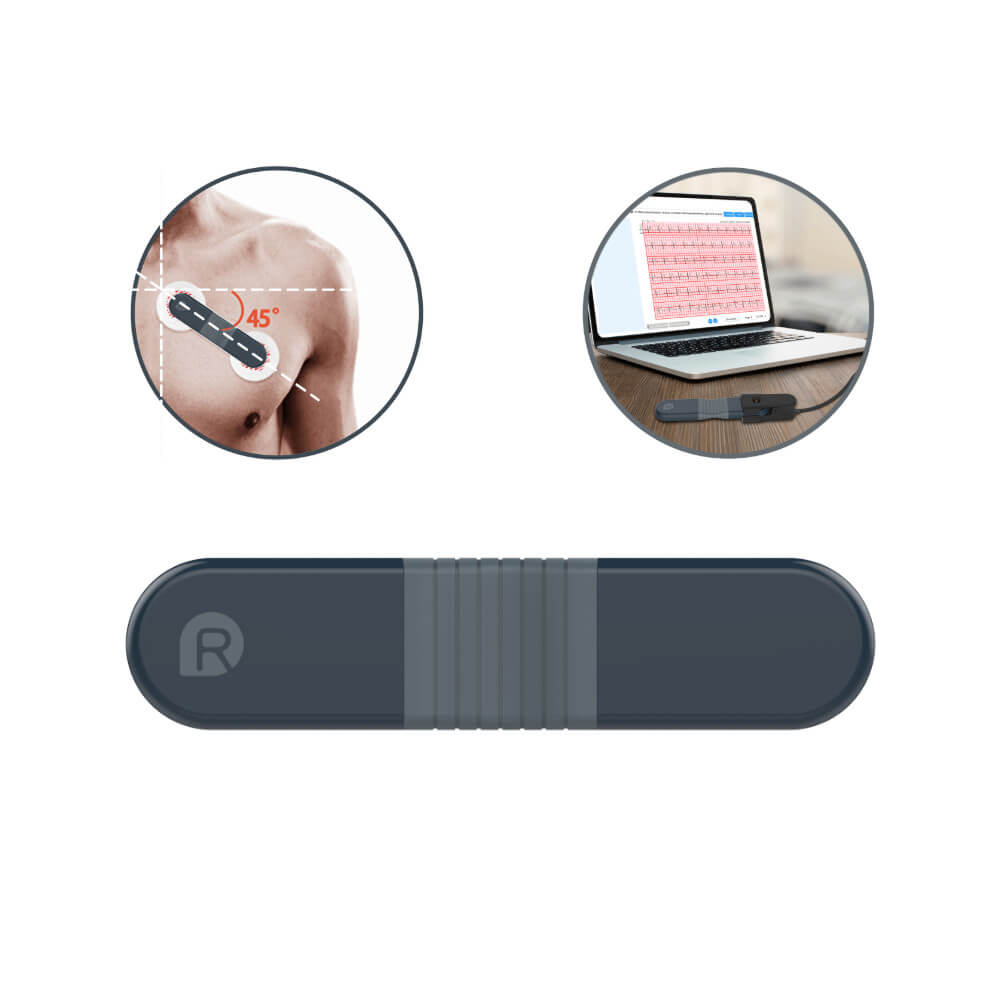
This monitor is ideal for anyone who needs continuous rhythm tracking at home—especially if you’re hoping to spot elusive arrhythmias that don’t show up during quick checks. Its AI-powered analysis is robust and helps flag potential afib or rhythm changes, though first-time users may face a brief learning curve with device setup and data interpretation. In real use, it’s a solid choice for people who’ve been told to monitor heart activity overnight or over multiple days, and who want reliable export options for sharing results with their clinician.
Touchscreen ECG Monitor
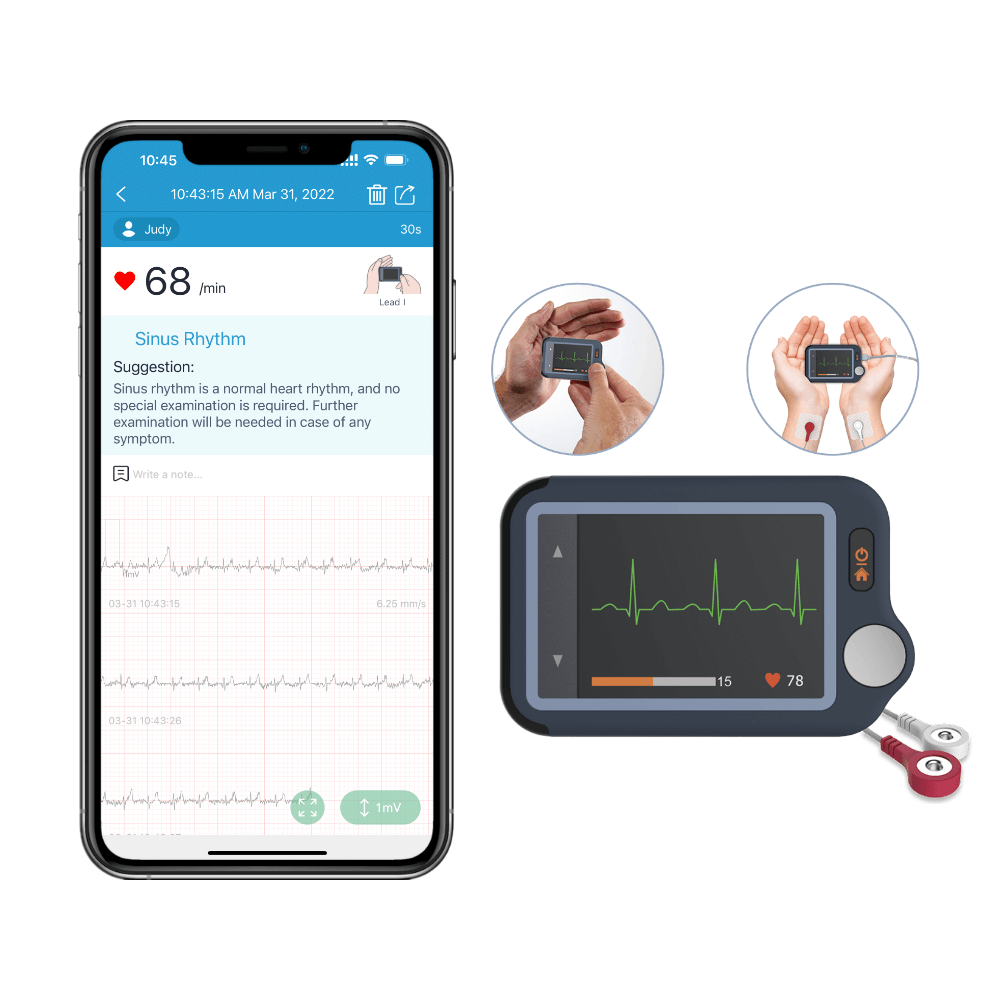
For quick, spot rhythm checks and convenient report sharing, the Touchscreen ECG Monitor stands out. It’s easy to use and fits right in your pocket or bag, making it perfect for travelers or anyone who needs to check heart rhythm on demand. While it isn’t meant for medical diagnosis and does require you to hold the device steady for best results, it excels at capturing snapshots you can easily export or show during telehealth visits.
Frequently Asked Questions
- What should I do if my home ECG monitor displays 'poor signal' or 'no lead detected'?
- How do I safely clean and maintain my home ECG monitor for long-term use?
- Can I use my home ECG monitor to detect atrial fibrillation (afib) reliably?
- What are the differences between a home ECG monitor and a Holter monitor?
- How do I interpret the data and reports generated by my home ECG monitor?
Explore More: Related Guides and Device Comparisons
For detailed setup help or deeper dives into device care, see our Device Setup & How-To Guides and other expert resources.
Related reading
Sources and verification
Last checked: February 10, 2026
-
24-Hour ECG Monitor with AI Analysis, Continuous ECG/EKG Monitoring at Home – Wellue
Most portable long-term ECG monitor with AI analysis. Most portable long-term ECG monitor with AI analysis. Help to capture heart abnormalities that are hard to detect during an electrocardiogram (ECG)
-
ECG Management System – Wellue
ECG data management for Biocare 12-lead ECG machines: 12-lead ECG tablet, iE300 3-channel ECG machine, iE6 6-channel ECG machine, iE12A 12-channel ECG machine. It is composed of the installation U disk, the USB dog driver and a set of serial port cable. And The U disk includes ECG Management installation program and the dongle program modules. • Compatible with Windows XP, Win7, Win8, Win10, Vista in 32/64 bit;• Connect with all Biocare ECGs by different ports: RS-232, USB, LAN and WIFI;• Support single file or batched files imported from ECGs;• Huge data storage and management capability;• High accuracy electronic ruler for ECG files re-analysis and re-edit;• Powerful standard and customized diagnosis templates;• Multiple file formats to export: XML, DICOM, BMP, JPG, PDF;• Support A4 paper printing.
-
Personal ECG Monitor with AI Analysis. Get ECGs & Results on Touchscreen or APP. – Wellue
Take ECG on your palm or take noise-free ECG with external cable as you like. Enable to take ECGs for kids with external cable. 30 seconds/60seconds/5minutes recording duration for choose.
-
Medical Devices | FDA
The .gov means it’s official.Federal government websites often end in .gov or .mil. Before sharing sensitive information, make sure you're on a federal government site. The site is secure. The https:// ensures that you are connecting to the official website and that any information you provide is encrypted and transmitted securely. Helping innovators, providers, and patients reimagine the home as an integral part of the health care system.
-
High Blood Pressure - What Is High Blood Pressure? | NHLBI, NIH
An official website of the United States government Official websites use .gov A .gov website belongs to an official government organization in the United States. Secure .gov websites use HTTPS A lock ( A locked padlock ) or https:// means you’ve safely connected to the .gov website. Share sensitive information only on official, secure websites.
-
High blood pressure (hypertension) - Symptoms & causes - Mayo Clinic
High blood pressure is a common condition that affects the body's arteries. It's also called hypertension. If you have high blood pressure, the force of the blood pushing against the artery walls is consistently too high. The heart has to work harder to pump blood. Blood pressure is measured in millimeters of mercury (mm Hg). In general, hypertension is a blood pressure reading of 130/80 mm Hg or higher. The American College of Cardiology and the American Heart Association divide blood pressure into four general categories. Ideal blood pressure is categorized as normal.