
Introduction: The Importance of Device Hygiene in Home Health Monitoring
Home medical monitors—whether tracking oxygen, heart rhythm, blood pressure, or sleep therapy—are now a cornerstone for millions managing health at home. But as these devices become more advanced and integrated into daily routines, cleanliness can’t be an afterthought. A neglected device isn’t just unsightly: it can mean unreliable readings and even infection risks. Device cleaning reminders and alerts help bridge that gap, but interpreting them isn’t always obvious. Let’s break down what these notifications mean and how you should respond.
Key Takeaways
- Device cleaning reminders are critical for ensuring accurate, safe readings from home medical monitors.
- Ignoring cleaning alerts increases risk of inaccurate results and infection.
- Different device types (CPAP, oxygen monitors, BP monitors, ECGs) may have unique alert systems and cleaning needs.
- Regular maintenance and correct response extend device lifespan and support better health outcomes.
Understanding Device Cleaning Reminders: What Do They Mean?
Common Types of Device Cleaning Alerts and Notifications
Most home medical monitors now include some form of cleaning alert—either as on-screen messages, app push notifications, or indicator lights. You might see messages like "Clean sensor now," "Tubing requires cleaning," or a symbol flashing after a set number of uses. These reminders are typically based on time since last cleaning, usage cycles, or detected sensor resistance (as with some CPAP or oxygen devices).
How Home Medical Monitors Detect the Need for Cleaning
Some devices rely on basic timers, triggering reminders after a fixed period or certain number of uses. Others use sensors to detect buildup (for example, changes in air flow or electrical contact), prompting more targeted reminders. For instance, if a CPAP machine senses reduced airflow, it may signal for filter or hose cleaning. Blood pressure cuffs and ECG pads, meanwhile, use interval-based reminders due to skin contact and sweat exposure.
Examples: Device Cleaning Alert Meaning on Popular Monitors
- Checkme Pro Vital Signs Monitor: You may get prompts like “Clean ECG lead” or “Wipe SpO2 sensor” after a number of uses or when the device detects inconsistent readings. Learn more.
- CPAP/APAP/BiPAP Devices: Alerts such as “Clean water chamber” or “Check filter” often pop up weekly or monthly, depending on usage and humidity settings.
Why You Shouldn’t Ignore Medical Monitor Cleaning Reminders
Risks of Poor Device Hygiene
Disregarding cleaning alerts isn’t just a matter of aesthetics. Contaminated surfaces and sensors can harbor bacteria or mold, particularly in warm, moist environments like sleep therapy devices. Worse, grime or residue can affect sensor accuracy, leading to unreliable oxygen, ECG, or blood pressure readings. This compromises your ability to track health—and can impact clinical decisions if you share reports with a provider.
How Cleaning Reminders Help Maintain Device Reliability
Systematic reminders help you catch maintenance tasks before problems arise. By responding promptly, you keep sensors functioning optimally and avoid unnecessary troubleshooting or device downtime.
How to Respond: Step-by-Step Guide to Cleaning Your Home Medical Monitor
Preparing for Safe Device Cleaning (Supplies & Safety Tips)
- Always unplug your device and remove batteries if possible.
- Gather supplies: lint-free cloths, mild soap, distilled water, alcohol wipes (check your device’s manual for approved cleaners).
- Avoid harsh chemicals, bleach, or abrasive pads.
General Cleaning Steps for ECG, Oxygen, BP, and Sleep Therapy Devices
- Wipe external surfaces with a damp, soapy cloth. For sensors (like ECG leads or SpO2 probes), use an alcohol wipe or a manufacturer-approved solution.
- For tubing or chambers (as in CPAP devices), soak in warm, soapy water, rinse thoroughly, and air dry.
- Allow all components to dry completely before reassembling and powering up.
Manufacturer-Specific Guidelines and Where to Find Them
Always defer to the cleaning section in your device’s manual. Some brands, like Wellue’s Checkme Pro, provide downloadable guides or app-based prompts. If you’ve misplaced the manual, most brands post PDFs on their support pages.
Interpreting Cleaning Alerts Across Device Types
Overnight Oxygen and Sleep Therapy Devices (CPAP/APAP/BiPAP)
Expect regular reminders for mask, tubing, and water chamber cleaning. For instance, a weekly “Clean water tank” alert is common. If using a portable oxygen concentrator, the device may prompt you to wipe the exterior or check the filter after certain hours of use.
Portable Oxygen Concentrators and Blood Pressure Monitors
Concentrators typically signal filter cleaning or replacement; BP monitors may remind you to wipe the cuff and sensors, especially after multiple users or heavy sweating. The Central Monitoring Software can help track device status and cleaning events for multi-user environments.
Home ECG and Rhythm Monitors: Cleaning Frequency and Reminders
ECG and rhythm monitors often prompt cleaning after a set number of tests. For adhesive electrodes, replace as directed—cleaning reminders here may focus on the reusable leads or cables.
Troubleshooting: What If Your Device Keeps Sending Cleaning Reminders?
Possible Causes of Persistent Alerts
- Sensor not cleaned thoroughly or still damp when reconnected.
- Missed confirming the cleaning step in the device or app.
- Software glitch—sometimes a restart or firmware update resolves this.
When to Seek Technical Support
If alerts persist after a thorough cleaning and reset, consult the manufacturer’s support or your supplier. Avoid disabling alerts: they’re there to safeguard both device and user.
Best Practices for Maintaining Device Hygiene Long-Term
Establishing a Cleaning Schedule
Don’t wait for alerts. For most devices, weekly cleaning is a safe minimum. High-humidity or multi-user environments may require more frequent attention.
Documenting Cleanings for Home Health Records
Keep a simple log—either on paper, in your device’s app, or using a spreadsheet. This helps with troubleshooting and may be useful if you share data with a healthcare team.
Recognizing Device-Specific Maintenance Needs
Some components (like filters or electrodes) need replacing, not just cleaning. Track replacement intervals and follow manufacturer recommendations.
Reading Device Cleaning Reports and Logs
Where to Find Cleaning History on Your Device
Many modern monitors store cleaning and maintenance logs accessible via the device menu or app. For example, the Checkme Pro uploads event logs to its companion app for easy reference. If your device integrates with central software (like Wellue’s Central Monitoring Software), you can review maintenance across multiple devices—ideal for caregivers or families managing several monitors.
How to Use Cleaning Logs to Improve Device Lifespan
Regularly reviewing these logs helps identify missed cleanings or recurring issues. This proactive approach can extend your device’s lifespan and reduce the chances of malfunction.
Who This Is For
This guide is for anyone using home medical monitors—whether you’re managing sleep apnea with a CPAP, tracking blood pressure, monitoring oxygen overnight, or supporting a loved one at home. It’s especially helpful for new users, caregivers, and anyone who’s ever wondered what that nagging cleaning alert really means.
If You’re Unsure
If you’re not sure whether to act on a device cleaning reminder, err on the side of caution. A quick wipe-down or cleaning cycle is preferable to risking inaccurate readings—or a device that fails when you need it most. When in doubt, consult your device’s manual or reach out to the manufacturer’s support team.
Conclusion: Staying Proactive with Device Cleaning and Maintenance
Device cleaning reminders aren’t optional—they’re a crucial safeguard for your health and the reliability of your home monitoring setup. Taking them seriously, understanding their meaning, and responding promptly ensures your data stays trustworthy and your devices last longer. When in doubt, always refer to your manufacturer’s guidance.
Recommended Products
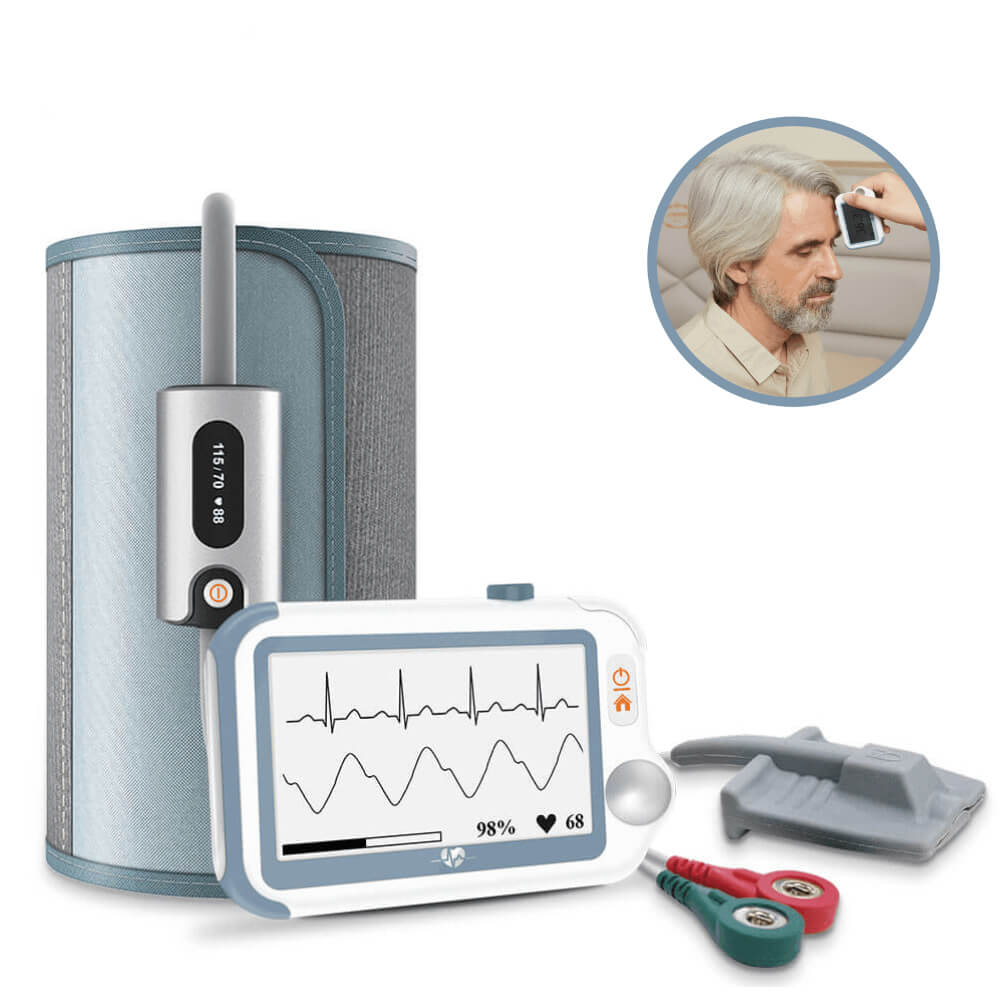
- Checkme Pro Vital Signs Monitor: Best for users wanting an all-in-one, portable device that alerts you when cleaning is needed. Its reminders are clear, and the companion app makes tracking maintenance easy. One minor limitation is that some cleaning steps must be confirmed in the app, which may be less intuitive for non-tech users. If you’re monitoring multiple parameters at home, this device streamlines both health data and hygiene routines.
- Central Monitoring Software: Ideal for families or caregivers tracking several devices. This software aggregates cleaning logs and usage across multiple monitors, making it easier to stay on top of maintenance. One limitation is that some setup is required on your PC or network. It’s a practical solution for those managing health for more than one person at home.

If you’re weighing between a single smart monitor and a central system, consider how many devices you manage and whether you need reminders in-app or aggregated logs.
Related reading
Sources and verification
Last checked: February 10, 2026
-
The Central Monitoring Software enables real-time monitoring of vital signs from 1 to 64 of our patient monitors over a wired LAN network. – Wellue
The Central Monitoring Software enables real-time monitoring of vital signs from 1 to 64 of our 8-inch touchscreen patient monitors with printer and/or 10.4-inch touchscreen patient monitors with printer over a wired LAN network, showing both live and historical data with powerful analysis tools, helping healthcare providers deliver safer, more informed patient care. Dual-Screen Support Monitor up to 16 patients simultaneously per screen. Broad Windows Compatibility Runs seamlessly across Windows XP through Windows 11.
-
Checkme Pro Handheld Touchscreen Vital Signs Monitor for ECG, Oxygen Level, Heart Rate, Blood Pressure, Temperature. – Wellue
Limited Time Offer | Save 60% at checkout Automatically *Exclusively for Australia – fast shipping from our local AU warehouse. For a device the size of three fingers, the Checkme™ Pro Vital Signs Monitor is amazing. You can read the functions; I won't re-hash them here. * The separate but included blood pressure cuff is convenient, comfortable, and simple to use. The device and system elements are accurate within expected limits in spot checks against Welch Allyn diagnostic instruments, and, after months of use, the Checkme Pro has proven reliable. All parts of the system are sturdy, appear well-made of appropriate materials, and have functioned flawlessly -- cabled and wireless. * I bought the device for on-the-go self-monitoring during the novel coronavirus (CoVid-19) pandemic. I wanted to be able to measure, visualize, and store key vital signs: pulse rate; oximetry; rudimentary heart function (single lead ECG); external, non-contact (forehead IR) temperature; and, systolic blood pressure (algorithm estimate after calibration with bp cuff). I have not yet used the Holter monitor or overnight SpO2 monitors. The package supplies a few ECG electrodes; standard 3M electrode patches work as well. I don't have a Windows computer, so I have not tested the PC software, but if it's as good as the rest of the system, Windows users should be pleased. * The Checkme comes with a stretch neoprene glove that stays out of the way yet provides excellent case protection, a lanyard, and contains an internal, rechargeable battery good for at least a week of hard use before recharge with a hard-to-find USB cable. * The companion app for iPhone (and, I believe, Android) captures readings from the Checkme device via Bluetooth. Data transfer takes place on demand, and it takes only moments to move measurements from the monitor to your phone where they display beautifully, may be saved, and/ or sent via email to a healthcare provider or record storage. * The screen on the Checkme is sufficient for a quick ECG review, and an on-board algorithm will alert to (but not diagnose) irregularities. Of course, other data such as SpO2, temperature, etc. are listed in date/time stamped tables. Data remain on the device following transfer to the phone app, and must be deleted manually. (This is a Good Thing.) Finally, customer service at Getwellue.com is first rate ... amazing. I requested a soft copy of a Checkme-related document. I received it via email in a couple of hours. I had a question about a Checkme cable. A customer service representative from Getwellue provided what I needed immediately. My only concern is the proprietary nature of system components and cables, but dealing with Wellue customer service has convinced me that, should replacements be necessary and unavailable locally, Wellue is capable of supplying what I may need quickly and fairly. All-in-all, a game-changer. If the pandemic gets worse, perhaps a life-saver. Well done!
-
International power cord. For use outside the U.S.(100-240v). For Auto-CPAP / APAP or Auto BiPAP machine. – Wellue
This item may be delivered separately from the PAP device and may take a few additional days (2-4 days) for delivery. Please log in with the same user name you used to buy our PAP machine to order the International Power Cord. If you forget the user name, please contact us first at support@getwellue.com Please note that we will CANCEL the order WITHOUT notifying you if you have not yet purchased any PAP machine from getwellue.com. Thank you for your understanding!
-
Medical Devices | FDA
The .gov means it’s official.Federal government websites often end in .gov or .mil. Before sharing sensitive information, make sure you're on a federal government site. The site is secure. The https:// ensures that you are connecting to the official website and that any information you provide is encrypted and transmitted securely. Helping innovators, providers, and patients reimagine the home as an integral part of the health care system.
-
High Blood Pressure - What Is High Blood Pressure? | NHLBI, NIH
An official website of the United States government Official websites use .gov A .gov website belongs to an official government organization in the United States. Secure .gov websites use HTTPS A lock ( A locked padlock ) or https:// means you’ve safely connected to the .gov website. Share sensitive information only on official, secure websites.
-
High blood pressure (hypertension) - Symptoms & causes - Mayo Clinic
High blood pressure is a common condition that affects the body's arteries. It's also called hypertension. If you have high blood pressure, the force of the blood pushing against the artery walls is consistently too high. The heart has to work harder to pump blood. Blood pressure is measured in millimeters of mercury (mm Hg). In general, hypertension is a blood pressure reading of 130/80 mm Hg or higher. The American College of Cardiology and the American Heart Association divide blood pressure into four general categories. Ideal blood pressure is categorized as normal.