Quick take
We break down who this device is best for, what it measures, and how it compares in the market.

Introduction: Why Pulse Rate Variability Matters in Home Monitoring
Home health tracking is changing the way we spot trends and manage wellness. For anyone monitoring sleep quality, heart health, or the effects of conditions such as sleep apnea, pulse rate variability (PRV) on your oximeter report deserves your attention. While SpO2 (blood oxygen) often takes center stage, understanding your pulse rate patterns—especially overnight—can offer meaningful clues about your body's response to sleep, stress, and overall health.
What Is Pulse Rate Variability (PRV)?
PRV refers to the natural changes in your heart rate from one moment to the next. On an oximeter, this is typically shown as a trend line or a graph of beats per minute (BPM) over time. High variability can be a sign of good adaptability, while low or erratic variability may point to underlying issues. Unlike clinical-grade heart rate variability (HRV) measured on ECG devices, PRV is derived from the pulse wave detected by your oximeter sensor. Still, it provides a useful at-a-glance metric for daily or nightly health tracking.
Role of Pulse Oximeters in Home Health Tracking
Modern pulse oximeters—especially those designed for overnight use—provide more than just a spot check. Devices like the O2ring S Pulse Oximeter and Wellue's Fingertip models record SpO2 and pulse rate every second, building a detailed picture of your overnight trends. With app-based reports, you can quickly spot when your heart rate spikes, drops, or fluctuates more than usual, which is where PRV comes into play.
Key Takeaways
- Pulse rate variability (PRV) gives insight into your heart's adaptability and stress response, especially during sleep.
- Oximeter reports can help you identify trends and know when to consult your healthcare provider.
- Choosing the right device and setting it up properly are crucial for accurate overnight PRV tracking.
- Regular review and maintenance of your oximeter ensure reliable, actionable health data.
Decoding Oximeter Reports: Key Metrics and What They Mean
Core Report Metrics: SpO2, Pulse Rate, and PRV
Your oximeter report typically shows three main numbers: SpO2 (blood oxygen saturation), pulse rate (heartbeats per minute), and a trend or graph reflecting PRV. Some devices summarize overnight averages and highlight periods of abnormal readings. Look for spikes, sudden drops, or periods where your pulse rate is unusually steady or erratic.
Typical Patterns Seen in Overnight Monitoring
During restful sleep, most healthy adults see a gentle up-and-down in heart rate, with slower pulses during deep non-REM stages. Short bursts of higher PRV can be related to REM sleep or brief arousals. Repeated sudden changes—especially if paired with drops in SpO2—may be worth bringing up with your doctor, especially for those with sleep apnea or cardiovascular risk.
How to Read and Interpret Pulse Rate Trends
- Scan the entire night: On your app or printout, look for overall regularity. Minor, smooth changes are normal; wild swings or plateaus may be notable.
- Match events with symptoms: Did you wake up feeling unrested or with palpitations? Check if your pulse rate was unusually high or low at that time.
- Compare nights: A single blip isn't usually a concern, but ongoing trends—like steadily increasing overnight heart rate—might prompt further discussion.
Pulse Rate Variability: What It Tells You About Your Health
Normal vs. Abnormal PRV on a Pulse Oximeter
Normal PRV in healthy adults often means gentle fluctuations in pulse rate, without abrupt spikes or long periods of flatness. Abnormally high variability can be linked to stress, disrupted sleep, or arrhythmias; very low variability may reflect certain chronic conditions or medication effects. Always interpret these patterns alongside your symptoms and in consultation with a healthcare professional.
Common Causes of Variability: Sleep, Activity, and Devices
- Sleep stages: REM sleep naturally causes PRV changes as your brain becomes more active.
- Movement: Rolling over, snoring, or adjusting your CPAP (especially for CPAP side sleepers) can trigger heart rate shifts.
- Device artifacts: Poor sensor contact, cold hands, or battery issues can sometimes create false variability. Always ensure a snug, comfortable fit and check your device's battery before use.
When to Be Concerned About Your Pulse Rate Readings
If you consistently see pulse rates above 100 BPM or below 40 BPM, or if your report flags frequent, unexplained spikes, it's wise to discuss these findings. Even the O2ring S offers vibration alerts for abnormal pulse rates, helping you spot issues in real time. Persistent concerning patterns—especially if matched with symptoms—warrant professional input.
Choosing a Pulse Oximeter for Accurate Overnight Monitoring
Key Features to Look For
- Accuracy: Look for FDA-cleared models and read customer feedback on signal reliability.
- Comfort: For overnight use, a soft ring (like the O2ring S) or a well-designed fingertip sensor makes a difference.
- Report Quality: Ensure your device provides easy-to-read trend graphs and allows you to share data with your doctor. App integration is a plus.
Best Budget Pulse Oximeter for Home Use
For those watching their spending but wanting reliable overnight data, the Smart Fingertip Pulse Oximeter stands out. It pairs continuous SpO2 and pulse tracking with a straightforward app, delivering trustworthy overnight reports at a reasonable price.
What to Expect from Smart Ring and Fingertip Models
The O2ring S Pulse Oximeter is best for those prioritizing comfort and minimal disruption overnight. Its compact ring design fits most users and provides vibration alerts if your pulse or oxygen levels stray out of normal range. However, ring sensors may not suit everyone—some find the fit or overnight feel distracting. Fingertip models like the Wellue Smart Fingertip Pulse Oximeter are versatile and easy to use, but can slip off with restless sleep or certain hand movements. Both options deliver reliable reports when set up correctly, making them solid choices for home monitoring.
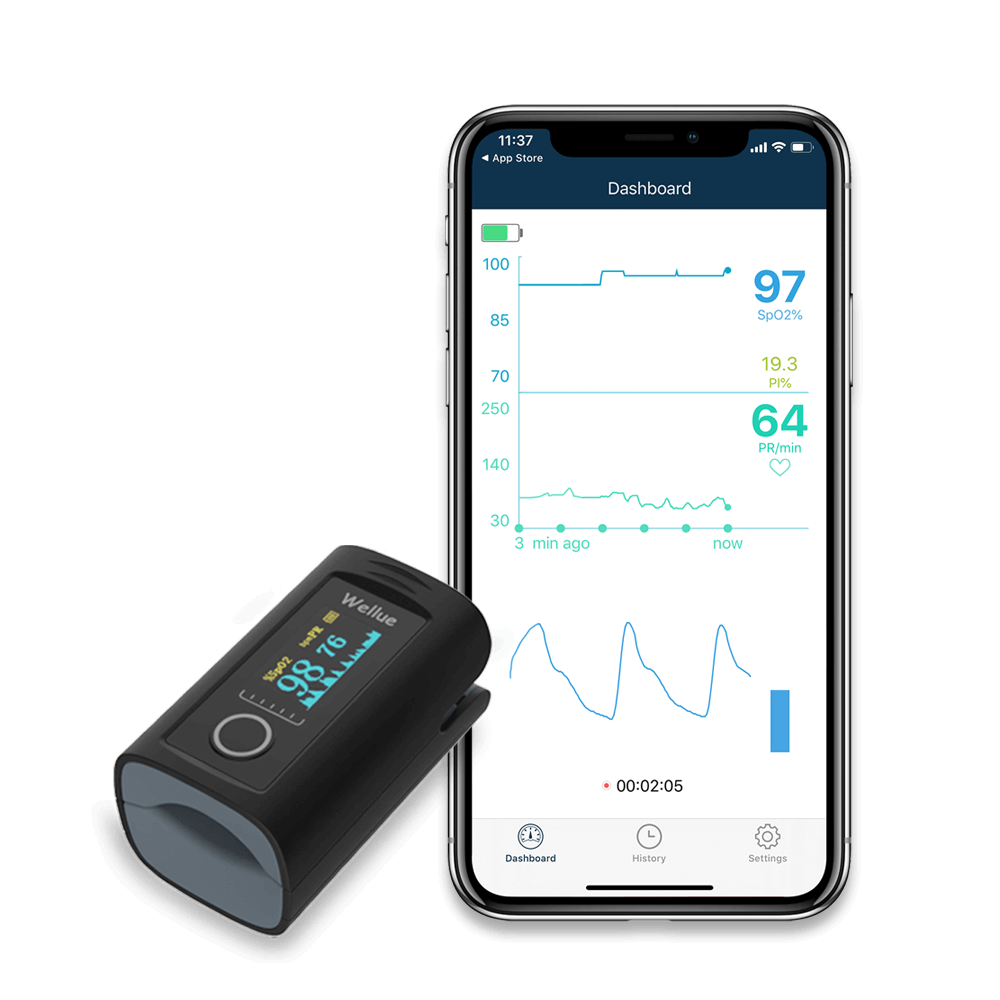
Actionable Steps: What to Do with Your Pulse Rate Variability Data
How to Track and Share Reports with Your Doctor
- Sync your device with its app after each night of monitoring.
- Review the overnight pulse rate and SpO2 trends, noting any periods of concern.
- Export or screenshot the relevant report sections to bring to your next checkup.
When to Seek Medical Advice
- If you notice new, persistent patterns of high or low pulse rate variability
- If your device triggers frequent alerts or you experience symptoms like palpitations, dizziness, or chest discomfort
- If you have risk factors for heart or lung conditions and your reports show significant, unexplained changes
Questions to Ask at Your Next Checkup
- Are my overnight pulse rate trends typical for someone with my health background?
- Could my sleep position or device fit be impacting the readings?
- Is there value in sharing longer-term PRV trends for my care plan?
Practical Tips for Device Setup, Maintenance, and Cleaning
Getting Started with Your Oximeter
- Charge or insert fresh batteries before first use.
- Choose a finger or ring size that fits snugly but isn't too tight.
- Follow the app's pairing instructions for seamless data transfer.
Routine Cleaning and Care for Reliable Readings
- Wipe down the sensor area with a soft, damp cloth after each use.
- Avoid harsh cleaners or soaking the device.
- Store in a dry place to prevent moisture damage.
Troubleshooting Common Issues
- If readings seem erratic, ensure your hands are warm and the device fits securely.
- Check for low battery if the device disconnects or fails to sync.
- Consult the device manual for error messages or persistent issues.
Who This Is For
If you're interested in tracking your sleep quality, managing conditions like sleep apnea, or simply want actionable heart health data at home, understanding pulse rate variability on your oximeter is crucial. Whether you're evaluating how to choose a pulse oximeter for overnight monitoring or just want the best budget pulse oximeter for home use, this guide is designed for you.
If You're Unsure
If you're new to overnight tracking, start with a device that offers clear reports and easy app syncing, like the O2ring S. For those who want a simple, affordable solution, a fingertip oximeter is a practical entry point. Prioritize comfort and clarity of data—if a device feels awkward or the app is confusing, consider another model. Bring your reports to your doctor for review if you're ever uncertain about the results.
Key Takeaways
- Pulse rate variability is a valuable home metric for heart and nervous system health.
- Context and trends matter more than one-off numbers—look for patterns over days or weeks.
- Invest in a comfortable, accurate device and review your data periodically with your healthcare provider.
FAQs: Pulse Rate Variability and Home Oximetry
- What is considered a normal range for pulse rate variability on a home oximeter?
- There’s no universal "normal," but gentle up-and-down changes overnight are typical. Sudden, repeated spikes or drops can be a signal to consult your doctor.
- How do activity, sleep position, or device type affect PRV readings?
- Movement, restless sleep, and loose-fitting sensors can all impact PRV data. Side sleeping with CPAP, for example, may cause more variability than back sleeping. Consistency in how and when you measure helps ensure reliable trends.
- When should I be concerned about high or low pulse rate variability?
- If you see persistent, unexplained high or low variability, especially with symptoms like palpitations or fatigue, bring your findings to a healthcare professional for assessment.
- Can budget pulse oximeters track overnight pulse rate variability accurately?
- Many budget models, like the Wellue Smart Fingertip Pulse Oximeter, offer reliable pulse rate tracking overnight if worn properly and paired with a good app.
- How do I share my oximeter reports with my doctor for follow-up?
- Most modern devices and apps allow you to export reports as PDFs or screenshots. Bring these to your appointment or send them via your provider’s patient portal for review.
Further Reading & Related Home Health Monitoring Guides
Explore more tips on how to choose a pulse oximeter for overnight monitoring or see our latest reviews of the best budget pulse oximeter for home use.